The organisers of ScrapFest by the Lee have been on to let us know that the event will now take place on Saturday the 6th October, 2007 only. If you're interested in coming to this great day of scrapbooking and papercrafting, please contact Mary at 086-8261506/086-3201021 or by email at scrapfestbythelee@eircom.net. All profits from the event go to Action Breast Cancer.
An all-day ticket costs €40.00 and entitles you to dedicated scrapping space in the Scrappin' Studio PLUS light lunch, morning and afternoon refreshments PLUS a goodie bag!!
They also have 7 optional classes available to book. None of the classes overlap which means you don't have to miss out on anything. Classes cost €20.00 each.
There'll be plenty of shopping available (TheScrapbookStore.ie and Crafteire for starters!!) and there'll also be great prizes throughout the day.
Monday, September 17, 2007

Tuesday, September 11, 2007
September Kit now in stock plus Workshop Dates available
We've just finished packing up the new September Kit and it is lush!! This month we've used the gorgeous Autumn Collection from Daisy D's Paper. The possibilities are endless with this kit as the colours are so versatile. Back to School layouts, Autumn layouts, Heritage or Wedding layouts will all look fantastic with these beautiful detailed papers and accessories.
 Everything in the kit co-ordinates and this is what's in it:

The whole lot including postage costs €25.00 and you can buy it by clicking here.
WORKSHOP NEWS ....
September:
17th - Ratoath Community Centre, Main Street, Ratoath, County Meath from 11am to 12noon. All are welcome to our Free Scrapbooking Demonstration and for anyone interested in starting to scrapbook it's a great chance to see what it's all about. Monthly Workshops will commence in Ratoath on Monday morning at 10.30am on October 22nd.
27th - Whitehall Parish Centre, The Thatch Road, Whitehall, Dublin 9 from 7pm to 10pm
At this month's Workshop we'll be making a calendar using the new Karen Foster Special Occasions Calendar Base and Micro Bundle Calendar Kit. The Workshop costs €25.00 and with this month's kit worth €22.00 that's got to be good news!
October:
20th - The Silver Bear Centre, Bawnboy, County Cavan. We're back in Cavan in October for a fabulous Halloween themed class. This is an all day Retreat in the beautiful Silver Bear Centre and a great chance to chill out and scrap. The day runs from 10am to 6pm with two classes and loads of cropping time. It all costs €35.00 or €15.00 if you just want to come along and crop.
22nd - Ratoath Community Centre, Main Street, Ratoath, County Meath from 10.30am to 12.30pm. We'll be making some gorgeous Halloween goodies at this Workshop, just in time for the witching season!!
25th - Whitehall Parish Centre, The Thatch Road, Whitehall, Dublin 9. We're back in Whitehall for our regular monthly workshop.
If you'd like more details or if you'd like to book a place at any of our workshops just email workshops@thescrapbookstore.ie we'd love to hear from you.
Everything in the kit co-ordinates and this is what's in it:- 2 Sheets of Bazzill Cardstock - White and Lily Pad
- 7 Sheets of Daisy D's Patterned Paper
- 1 Pack of Cardstock Die-Cuts
- 1 Pack of Rub-on Transfer
- 3 Yards of Assorted co-ordinating ribbon.
- 36 assorted co-ordinating buttons.
The whole lot including postage costs €25.00 and you can buy it by clicking here.
WORKSHOP NEWS ....
September:
17th - Ratoath Community Centre, Main Street, Ratoath, County Meath from 11am to 12noon. All are welcome to our Free Scrapbooking Demonstration and for anyone interested in starting to scrapbook it's a great chance to see what it's all about. Monthly Workshops will commence in Ratoath on Monday morning at 10.30am on October 22nd.
27th - Whitehall Parish Centre, The Thatch Road, Whitehall, Dublin 9 from 7pm to 10pm
At this month's Workshop we'll be making a calendar using the new Karen Foster Special Occasions Calendar Base and Micro Bundle Calendar Kit. The Workshop costs €25.00 and with this month's kit worth €22.00 that's got to be good news!
October:
20th - The Silver Bear Centre, Bawnboy, County Cavan. We're back in Cavan in October for a fabulous Halloween themed class. This is an all day Retreat in the beautiful Silver Bear Centre and a great chance to chill out and scrap. The day runs from 10am to 6pm with two classes and loads of cropping time. It all costs €35.00 or €15.00 if you just want to come along and crop.
22nd - Ratoath Community Centre, Main Street, Ratoath, County Meath from 10.30am to 12.30pm. We'll be making some gorgeous Halloween goodies at this Workshop, just in time for the witching season!!
25th - Whitehall Parish Centre, The Thatch Road, Whitehall, Dublin 9. We're back in Whitehall for our regular monthly workshop.
If you'd like more details or if you'd like to book a place at any of our workshops just email workshops@thescrapbookstore.ie we'd love to hear from you.
Friday, August 31, 2007
ScrapWest Blog Celebration!!!

Over at the ScrapWest blog this week's theme is a celebration of blogs! So we're asking everyone to join in and share some of their crafty secrets on their blogs and we'll link to them.
I love downloading free fonts from the internet and use computer printed journalling in most of my scrapbook layouts. It wouldn't be possible to have stickers, stamps or rubons for every occasion but I can always find the perfect font to match every project. One of my favourite sites for free fonts is http://www.dafont.com/ and one of my favourite fonts is called "Mom's Typewriter". I find it suits lots of layout styles as its kind of rustic and distressed!!
I hope you can see the screen snapshots ok - they seemed to get smaller once I uploaded them!!! BTW I used Windows XP.
Step 1 - Go to http://www.dafont.com/ and find the font you're looking for either by style or by name. In this case I put the words into the search facility. Once the font appears you'll see a box on the right hand side of the page which you click to download the font to your pc.

Step 2: Once you've clicked "Download" a pop-up box will appear asking if you want to "open" or "save". Always choose "save".

Step 3: Once you've clicked "save" you'll now have to choose where to put the file containing the font. It's best to keep all your fonts in the one place so you should use the "Fonts" folder which should already be on your hard-drive. It contains all the preinstalled fonts which you use in Microsoft Word e.g. Arial, Times New Roman etc. If you're having trouble finding it, it should be at C:\WINDOWS\Fonts. Once you've opened the fonts folder click "Save" and the font will be saved into the Fonts file as "Mom's Typewriter".

Ok, you've now saved the new font in the proper folder. Now it's time to install the font into Word so that you can use it in your journalling.
Click on the "Start" button at the bottom left of your screen and go to "Control Panel". If you're not using Windows XP you might have to get to your Control Panel another way.

Once you've clicked "Control Panel" this new screen should appear. What you're looking for here is the "Appearances and Themes" category. Once you've found it, click on it once.
 Once you've clicked "Appearance and Themes" this new screen should appear. On the left hand side of the screen there is an icon for the "Fonts" folder. Remember this is where you saved your new font to. Click on the "Fonts" folder icon.

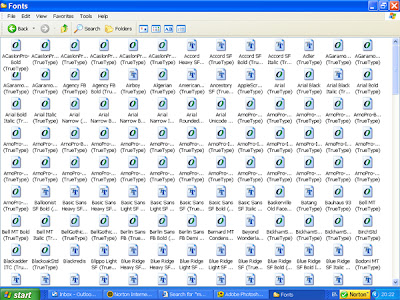
To install the font so that you can use it in Word. Click "File" at the top left of the screen. Now move the mouse down and click "Install Font".
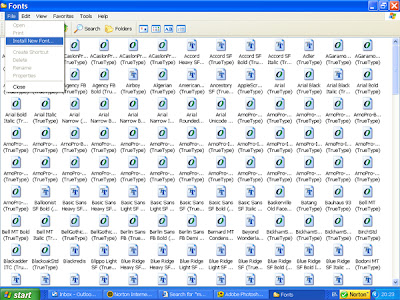
A new pop-up window will appear asking you to choose the location of the fonts you wish to install. Again choose C:\windows\fonts
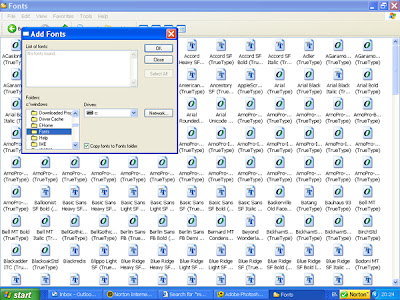
The list of fonts will then appear in the top left window of the pop-up and you simply click on the name of your new font "Mom's Typewriter" and then click OK and voila! your font is now installed.
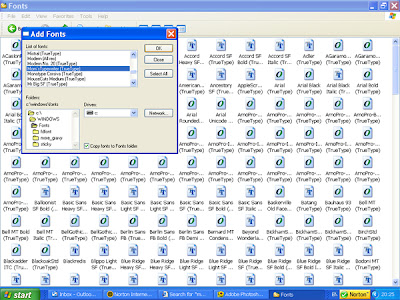
To check if you've done all of it right open up Microsoft Word and from the drop-down Fonts menu you should be able to find the name of your new font in alphabetical order all ready to use.

Once you've done all the hard work just type in your journalling in your new font. Then to make sure it fits into your layout print the journalling onto a plain A4 sheet. Choose the paper you want the journalling on in your layout and cut it to a size to fit onto the layout. Then, using removable!! adhesive, stick the piece of paper or card over where the journalling printed and run it through the printer again. The journalling will now be exactly where you want it. Just remove the cut piece and add it to your layout, card or other project.
I hope you find this useful. It looks so good it encourages me to add in that priceless journalling without having to use handwriting.
Don't forget to check out all the other crafty ideas on the ScrapWest blog and leave your comments with a link to your creations (if you're feeling inspired).
Anyone who leaves a comment here will have their name put into a raffle for a gorgeous prize of a new Basic Grey Collection Pack and I'll announce the winner next Friday.
Sunday, August 26, 2007
A great day in Cavan yesterday!
We had a brilliant day at our August Scrapbooking Retreat yesterday in The Silver Bear Centre, Bawnboy in the County of Cavan. Even though the weather didn't live up to expectations it was warm with a few bits of sunshine. I don't think many of the scrappers noticed though because they hardly left their seats! It was a very productive day and everyone seemed to be getting loads done.


One of Julie's stunning LO's:

A sample of Linda's gorgeous cards:

The class was a 12" x 12" boy themed layout using the gorgeous Crate Paper Zoom Collection and the finished layouts looked amazing. The mini book in a CD tin class used the same papers and again the finished books and tins looked fantastic.


Even though we were there from early morning until after 6pm the hours flew by. I don't know how much tea and coffee we all drank but we got through about 3 litres of milk between 20 of us. I think I had about half a dozen cups myself!! That must've been what kept everyone going, that and the chocolate, buns and craic :-)

Many thanks to everyone who travelled from near and far to make the day so special. We had scrappers from Cavan, Kildare, Dublin, Louth, Galway, Belfast and Donegal and what a brilliant crafty bunch you all were. I hope I'll get to meet you all again soon. Thanks also to Linda K who brought along her shop packed with mini books and other goodies.


TheScrapbookStore's next outing to Cavan is planned for October so keep an eye out for the dates and details on our workshops page. If you'd like to be notified by email about any of our upcoming classes just send your details to workshops@thescrapbookstore.ie


One of Julie's stunning LO's:

A sample of Linda's gorgeous cards:

The class was a 12" x 12" boy themed layout using the gorgeous Crate Paper Zoom Collection and the finished layouts looked amazing. The mini book in a CD tin class used the same papers and again the finished books and tins looked fantastic.


Even though we were there from early morning until after 6pm the hours flew by. I don't know how much tea and coffee we all drank but we got through about 3 litres of milk between 20 of us. I think I had about half a dozen cups myself!! That must've been what kept everyone going, that and the chocolate, buns and craic :-)

Many thanks to everyone who travelled from near and far to make the day so special. We had scrappers from Cavan, Kildare, Dublin, Louth, Galway, Belfast and Donegal and what a brilliant crafty bunch you all were. I hope I'll get to meet you all again soon. Thanks also to Linda K who brought along her shop packed with mini books and other goodies.


TheScrapbookStore's next outing to Cavan is planned for October so keep an eye out for the dates and details on our workshops page. If you'd like to be notified by email about any of our upcoming classes just send your details to workshops@thescrapbookstore.ie
Sunday, August 12, 2007
I've been tagged - loads!!

Thanks to everyone who tagged me.
Jackie was first with her card which I was totally chuffed about.
Then Eva and Lainey both tagged me with the "7 Things Tag". I had a laugh thinking of these - thanks to both of you.
Here goes 7 things about me:
1. I was once 3 stone heavier.
2. I love Indian food especially Channa Masala from Kinara (that isn't why I was 3 stone heavier!)
2. I love Indian food especially Channa Masala from Kinara (that isn't why I was 3 stone heavier!)
3. I've been to the original Ben & Jerry's Ice Cream Factory in Vermont (why are these all about food??)
4. I'm a secret (not any more) Johnny Logan fan.
5. I preferred Hutch to Starsky.
6. I took piano lessons until I was 18 (got to Grade VI)
7. My favourite Zoo animal is the Meercat (soo cute)
As everyone else I know who has a blog has already been tagged - a few times - I'm off to find a few people to email.
Bye for now.
Subscribe to:
Posts (Atom)